 Posted by
Description:-
In this article we are going to see Oracle Automation-Oracle Database Creation Using Ansible Tool
Let’s start the Demo:-
Steps to create Oracle database using Ansible :-
Step 1:- Download the ansible modules from github site.Click Here
Step 2:-Move the ZIP file to ansible server.
[root@ansible SrikanthMac]# unzip ansible-oracle-master.zip
Archive: ansible-oracle-master.zip
1bbb35d690c102e23488537754ff8d1e0a99dc15
creating: ansible-oracle-master/
[root@ansible SrikanthMac]# ls -lrt
total 4272
drwxrwxr-x. 8 ansible ansible 4096 Jun 26 2015 ansible-1.9.2
-rwxrw-rw-. 1 ansible ansible 75962 Jan 8 2018 ansible-oracle-modules-master.zip
-rwxrw-rw-. 1 ansible ansible 1642329 Jul 19 23:21 get-pip.py
-rwxrw-rw-. 1 ansible ansible 927525 Jul 25 02:59 ansible-1.9.2.tar.gz
-rwxrw-rw-. 1 ansible ansible 1357336 Jul 25 03:14 ansible-1.9.2-1.mga5.noarch.rpm
drwxr-xr-x. 7 root root 4096 Jul 30 11:12 ansible-oracle-master
drwxrwxr-x. 3 ansible ansible 4096 Jul 30 18:04 ansible-oracle-modules-master
-rwxrw-rw-. 1 ansible ansible 349507 Jul 30 22:33 ansible-oracle-master.zip
Step 3:- Create a single instance database on filesystem level
Sample file:-
[root@ansible ]# cd ansible-oracle-master

[root@ansible ansible-oracle-master]# cat single-instance-db-on-fs.yml

[root@ansible ansible-oracle-master]#cat single-instance-db-on-fs.yml
- name: Host configuration
hosts: "{{ hostgroup }}"
become: yes
roles:
- common
- orahost
- cxoracle

- name: Database Server Installation & Database Creation
hosts: "{{ hostgroup }}"
become: yes
roles:
- oraswdb-install
- oradb-manage-db

- name: Database Server Installation & Database Creation
hosts: database-servers
user: oracle
sudo: yes
roles:
- oraswdb-install
- oradb-create
Note :I have already installed all prerequisites and oracle binaries hence i am not using that role oraswdb-install
Step 4:- Go to ansible-oracle-master/roles folder.Check oradb-create role is present for database creation.
[root@ansible ansible-oracle-master]# cd roles/
[root@ansible roles]# ls -lrt
total 0
drwxr-xr-x. 5 root root 61 Jul 30 11:12 oraswracdb-clone
drwxr-xr-x. 3 root root 21 Jul 30 11:12 orasw-meta
drwxr-xr-x. 5 root root 49 Jul 30 11:12 oraswgi-opatch
drwxr-xr-x. 6 root root 60 Jul 30 11:12 oraswgi-manage-patches
drwxr-xr-x. 5 root root 64 Jul 30 11:12 oraswgi-install
drwxr-xr-x. 6 root root 72 Jul 30 11:12 oraswgi-clone
drwxr-xr-x. 6 root root 60 Jul 30 11:12 oraswdb-manage-patches
drwxr-xr-x. 6 root root 60 Jul 30 11:12 oraswdb-install
drwxr-xr-x. 6 root root 61 Jul 30 11:12 orahost-storage
drwxr-xr-x. 4 root root 49 Jul 30 11:12 orahost-ssh
drwxr-xr-x. 5 root root 65 Jul 30 11:12 orahost-logrotate
drwxr-xr-x. 4 root root 49 Jul 30 11:12 orahost-cron
drwxr-xr-x. 7 root root 76 Jul 30 11:12 orahost
drwxr-xr-x. 5 root root 49 Jul 30 11:12 oraemagent-install
drwxr-xr-x. 5 root root 44 Jul 30 11:12 oradb-manage-users
drwxr-xr-x. 5 root root 44 Jul 30 11:12 oradb-manage-tablespace
drwxr-xr-x. 5 root root 44 Jul 30 11:12 oradb-manage-services
drwxr-xr-x. 5 root root 44 Jul 30 11:12 oradb-manage-roles
drwxr-xr-x. 5 root root 44 Jul 30 11:12 oradb-manage-redo
drwxr-xr-x. 5 root root 44 Jul 30 11:12 oradb-manage-pdb
drwxr-xr-x. 5 root root 44 Jul 30 11:12 oradb-manage-parameters
drwxr-xr-x. 5 root root 44 Jul 30 11:12 oradb-manage-grants
drwxr-xr-x. 6 root root 76 Jul 30 11:12 oradb-manage-db
drwxr-xr-x. 5 root root 49 Jul 30 11:12 oradb-failover
drwxr-xr-x. 4 root root 33 Jul 30 11:12 oradb-delete
drwxr-xr-x. 5 root root 60 Jul 30 11:12 oradb-datapatch
drwxr-xr-x. 5 root root 49 Jul 30 11:12 oradb-create
drwxr-xr-x. 4 root root 49 Jul 30 11:12 oraasm-manage-diskgroups
drwxr-xr-x. 5 root root 49 Jul 30 11:12 oraasm-createdg
drwxr-xr-x. 4 root root 33 Jul 30 11:12 cxoracle
drwxr-xr-x. 5 root root 49 Jul 30 11:12 common

[root@ansible roles]# cd oradb-create
[root@ansible oradb-create]# ls -lrt
total 4
drwxr-xr-x. 2 root root 4096 Jul 30 11:12 templates
drwxr-xr-x. 2 root root 40 Jul 30 11:12 tasks
drwxr-xr-x. 2 root root 21 Jul 30 11:12 defaults
[root@ansible oradb-create]# ls -lrt templates/
total 332
-rwxr-xr-x. 1 root root 6119 Jul 30 11:12 netca.rsp.12.2.0.1.j2
-rw-r--r--. 1 root root 6131 Jul 30 11:12 netca.rsp.12.1.0.2.j2
-rw-r--r--. 1 root root 6131 Jul 30 11:12 netca.rsp.12.1.0.1.j2
-rwxr-xr-x. 1 root root 5954 Jul 30 11:12 netca.rsp.11.2.0.4.j2
-rwxr-xr-x. 1 root root 5954 Jul 30 11:12 netca.rsp.11.2.0.3.j2
-rw-r--r--. 1 root root 1283 Jul 30 11:12 dotprofile-db.j2
-rw-r--r--. 1 root root 29254 Jul 30 11:12 dbca-create-db.rsp.12.2.0.1.j2
-rwxr-xr-x. 1 root root 78121 Jul 30 11:12 dbca-create-db.rsp.12.1.0.2.j2
-rwxr-xr-x. 1 root root 78122 Jul 30 11:12 dbca-create-db.rsp.12.1.0.1.j2
-rwxr-xr-x. 1 root root 47467 Jul 30 11:12 dbca-create-db.rsp.11.2.0.4.j2
-rwxr-xr-x. 1 root root 47394 Jul 30 11:12 dbca-create-db.rsp.11.2.0.3.j2
[root@ansible oradb-create]# ls -lrt tasks/
total 8
-rwxr-xr-x. 1 root root 4014 Jul 30 11:12 main.yml
-rw-r--r--. 1 root root 706 Jul 30 11:12 listener.yml
[root@ansible oradb-create]# ls -lrt defaults
total 8
-rw-r--r--. 1 root root 6860 Jul 30 11:12 main.yml
Roles in ansible tool :-
Roles expect files to be in certain directory names. Roles must include at least one of these directories, however it is perfectly fine to exclude any which are not being used. When in use, each directory must contain a main.yml file, which contains the relevant content:
Role directory structure :-
roles/
   common/
     tasks/
     handlers/
     files/
     templates/
     vars/
     defaults/
     meta/
   webservers/
     tasks/
     defaults/
     meta/
- tasks – contains the main list of tasks to be executed by the role.
- defaults – default variables for the role
- templates- contains templates which can be deployed via this role.
Install tree rpm to see the execution of .yml file :-
[root@ansible roles]# yum install tree
Loaded plugins: langpacks, ulninfo
Resolving Dependencies
--> Running transaction check
---> Package tree.x86_64 0:1.6.0-10.el7 will be installed
--> Finished Dependency Resolution
Dependencies Resolved
==========================================================================================================================
Package Arch Version Repository Size
==========================================================================================================================
Installing:
tree x86_64 1.6.0-10.el7 ol7_latest 46 k

Transaction Summary
==========================================================================================================================
Install 1 Package
Total download size: 46 k
Installed size: 83 k
Is this ok [y/d/N]: y
Downloading packages:
tree-1.6.0-10.el7.x86_64.rpm SUCCESS
Step 5:- Run the tree command and see the execution of .yml files to create a database
[root@ansible roles]# tree oraswdb-install
oraswdb-install
├── defaults
│   └── main.yml
├── meta
│   └── main.yml
├── tasks
│   ├── 11.2.0.3.yml
│   ├── 11.2.0.4.yml
│   ├── 12.1.0.1.yml
│   ├── 12.1.0.2.yml
│   ├── 12.2.0.1.yml
│   ├── 18.3.0.0.yml
│   ├── curl.yml
│   ├── get_url.yml
│   ├── init.yml
│   ├── install-home-db.yml
│   ├── main.yml
│   ├── remove-home.yml
│   └── systemd.yml
└── templates
├── db-install.rsp.11.2.0.3.j2
├── db-install.rsp.11.2.0.4.j2
├── db-install.rsp.12.1.0.1.j2
├── db-install.rsp.12.1.0.2.j2
├── db-install.rsp.12.2.0.1.j2
├── db-install.rsp.18.3.0.0.j2
├── dbora.j2
├── dotprofile-home.j2
├── glogin.sql.j2
├── oracle-rdbms-service.j2
├── oraInst.loc.j2
└── run-db-install.sh.j2

4 directories, 27 files
Step 6:- I have copied the single-instance-db-on-fs.yml file and named as dbcreation.yml as per the host entry and environment.
Change the main.yml entry present in defaults directory as below:-
[root@ansible ~]# cd /home/ansible/Desktop/ansible-oracle-master/roles/oradb-create/defaults
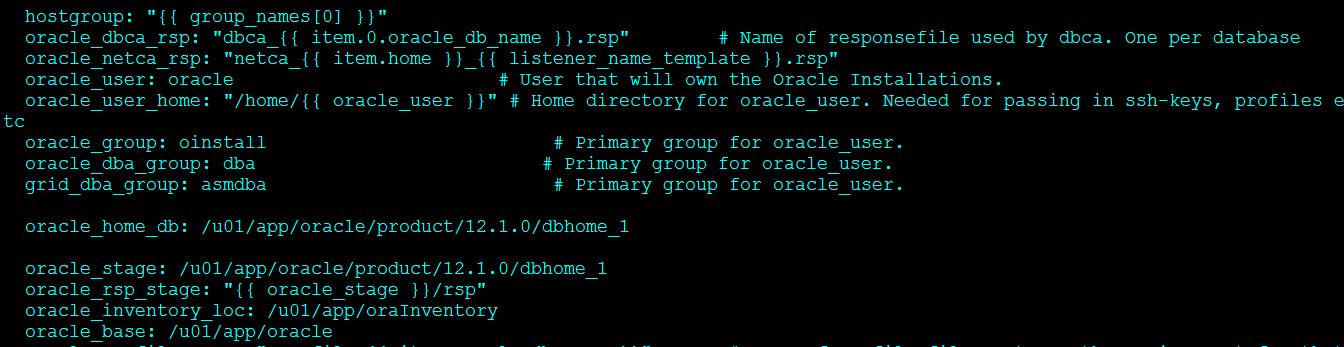
The below data is used to create a new database using ansible tool.
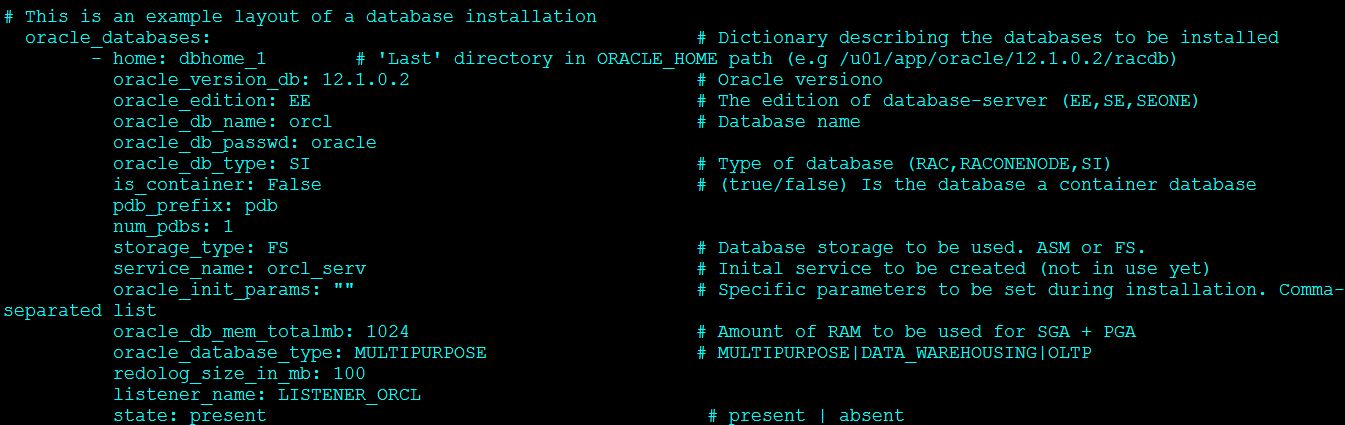
[root@ansible ansible-oracle-master]# cat dbcreation.yml

- name: Database Server Installation & Database Creation
hosts: db
user: oracle
sudo: yes
roles:
- oradb-create
Step 7:- Run the playbook dbcreation.yml file to create a database.
[root@ansible ansible-oracle-master]# ansible-playbook dbcreation.yml

PLAY [Database Server Installation & Database Creation] *******************************************************

GATHERING FACTS ***************************************************************
ok: [test]

TASK: [oradb-create | set fact] ***********************************************
ok: [test] => (item={'oracle_init_params': '', 'oracle_db_type': 'SI', 'service_name': 'orcl_serv', 'listener_name': 'LISTENER_ORCL', 'storage_type': 'FS', 'oracle_db_passwd': 'oracle', 'home': 'dbhome_1', 'is_container': False, 'redolog_size_in_mb': 100, 'num_pdbs': 1, 'pdb_prefix': 'pdb', 'oracle_db_name': 'orcl', 'state': 'present', 'oracle_edition': 'EE', 'oracle_db_mem_totalmb': 1024, 'oracle_database_type': 'MULTIPURPOSE', 'oracle_version_db': '12.1.0.2'})

TASK: [oradb-create | listener | Create responsefile for listener configuration] ***
ok: [test] => (item={'oracle_init_params': '', 'oracle_db_type': 'SI', 'service_name': 'orcl_serv', 'listener_name': 'LISTENER_ORCL', 'storage_type': 'FS', 'oracle_db_passwd': 'oracle', 'home': 'dbhome_1', 'is_container': False, 'redolog_size_in_mb': 100, 'num_pdbs': 1, 'pdb_prefix': 'pdb', 'oracle_db_name': 'orcl', 'state': 'present', 'oracle_edition': 'EE', 'oracle_db_mem_totalmb': 1024, 'oracle_database_type': 'MULTIPURPOSE', 'oracle_version_db': '12.1.0.2'})

TASK: [oradb-create | listener | Create listener] **************************************************
ok: [test] => (item={'oracle_init_params': '', 'oracle_db_type': 'SI', 'service_name': 'orcl_serv', 'listener_name': 'LISTENER_ORCL', 'storage_type': 'FS', 'oracle_db_passwd': 'oracle', 'home': 'dbhome_1', 'is_container': False, 'redolog_size_in_mb': 100, 'num_pdbs': 1, 'pdb_prefix': 'pdb', 'oracle_db_name': 'orcl', 'state': 'present', 'oracle_edition': 'EE', 'oracle_db_mem_totalmb': 1024, 'oracle_database_type': 'MULTIPURPOSE', 'oracle_version_db': '12.1.0.2'})

TASK: [oradb-create | Check if database is already created] *************************************************************
changed: [test] => (item={'oracle_init_params': '', 'oracle_db_type': 'SI', 'service_name': 'orcl_serv', 'listener_name': 'LISTENER_ORCL', 'storage_type': 'FS', 'oracle_db_passwd': 'oracle', 'home': 'dbhome_1', 'is_container': False, 'redolog_size_in_mb': 100, 'num_pdbs': 1, 'pdb_prefix': 'pdb', 'oracle_db_name': 'orcl', 'state': 'present', 'oracle_edition': 'EE', 'oracle_db_mem_totalmb': 1024, 'oracle_database_type': 'MULTIPURPOSE', 'oracle_version_db': '12.1.0.2'})

TASK: [oradb-create | Copy custom dbca Templates to ORACLE_HOME/assistants/dbca/templates] ***
skipping: [test] => (item=[{'oracle_init_params': '', 'oracle_db_type': 'SI', 'service_name': 'orcl_serv', 'listener_name': 'LISTENER_ORCL', 'storage_type': 'FS', 'oracle_db_passwd': 'oracle', 'home': 'dbhome_1', 'is_container': False, 'redolog_size_in_mb': 100, 'num_pdbs': 1, 'pdb_prefix': 'pdb', 'oracle_db_name': 'orcl', 'state': 'present', 'oracle_edition': 'EE', 'oracle_db_mem_totalmb': 1024, 'oracle_database_type': 'MULTIPURPOSE', 'oracle_version_db': '12.1.0.2'}])

TASK: [oradb-create | Create responsefile for dbca] ****************************************************
ok: [test] => (item=[{'oracle_init_params': '', 'oracle_db_type': 'SI', 'service_name': 'orcl_serv', 'listener_name': 'LISTENER_ORCL', 'storage_type': 'FS', 'oracle_db_passwd': 'oracle', 'home': 'dbhome_1', 'is_container': False, 'redolog_size_in_mb': 100, 'num_pdbs': 1, 'pdb_prefix': 'pdb', 'oracle_db_name': 'orcl', 'state': 'present', 'oracle_edition': 'EE', 'oracle_db_mem_totalmb': 1024, 'oracle_database_type': 'MULTIPURPOSE', 'oracle_version_db': '12.1.0.2'}, {u'cmd': u'grep orcl:/u01/app/oracle/product/12.1.0/dbhome_1 /etc/oratab |wc -l', u'end': u'2018-07-30 17:41:58.213870', u'stderr': u'', u'stdout': u'0', u'changed': True, u'rc': 0, 'item': {'oracle_init_params': '', 'oracle_db_type': 'SI', 'service_name': 'orcl_serv', 'listener_name': 'LISTENER_ORCL', 'storage_type': 'FS', 'oracle_db_passwd': 'oracle', 'home': 'dbhome_1', 'is_container': False, 'redolog_size_in_mb': 100, 'num_pdbs': 1, 'pdb_prefix': 'pdb', 'oracle_db_name': 'orcl', 'state': 'present', 'oracle_edition': 'EE', 'oracle_db_mem_totalmb': 1024, 'oracle_database_type': 'MULTIPURPOSE', 'oracle_version_db': '12.1.0.2'}, u'warnings': [], u'delta': u'0:00:00.060829', 'invocation': {'module_name': u'shell', 'module_args': u'grep orcl:/u01/app/oracle/product/12.1.0/dbhome_1 /etc/oratab |wc -l'}, 'stdout_lines': [u'0'], u'start': u'2018-07-30 17:41:58.153041'}])

TASK: [oradb-create | Create database(s)] ******************************************

changed: [test] => (item=[{'oracle_init_params': '', 'oracle_db_type': 'SI', 'service_name': 'orcl_serv', 'listener_name': 'LISTENER_ORCL', 'storage_type': 'FS', 'oracle_db_passwd': 'oracle', 'home': 'dbhome_1', 'is_container': False, 'redolog_size_in_mb': 100, 'num_pdbs': 1, 'pdb_prefix': 'pdb', 'oracle_db_name': 'orcl', 'state': 'present', 'oracle_edition': 'EE', 'oracle_db_mem_totalmb': 1024, 'oracle_database_type': 'MULTIPURPOSE', 'oracle_version_db': '12.1.0.2'}, {u'cmd': u'grep orcl:/u01/app/oracle/product/12.1.0/dbhome_1 /etc/oratab |wc -l', u'end': u'2018-07-30 17:41:58.213870', u'stderr': u'', u'stdout': u'0', u'changed': True, u'rc': 0, 'item': {'oracle_init_params': '', 'oracle_db_type': 'SI', 'service_name': 'orcl_serv', 'listener_name': 'LISTENER_ORCL', 'storage_type': 'FS', 'oracle_db_passwd': 'oracle', 'home': 'dbhome_1', 'is_container': False, 'redolog_size_in_mb': 100, 'num_pdbs': 1, 'pdb_prefix': 'pdb', 'oracle_db_name': 'orcl', 'state': 'present', 'oracle_edition': 'EE', 'oracle_db_mem_totalmb': 1024, 'oracle_database_type': 'MULTIPURPOSE', 'oracle_version_db': '12.1.0.2'}, u'warnings': [], u'delta': u'0:00:00.060829', 'invocation': {'module_name': u'shell', 'module_args': u'grep orcl:/u01/app/oracle/product/12.1.0/dbhome_1 /etc/oratab |wc -l'}, 'stdout_lines': [u'0'], u'start': u'2018-07-30 17:41:58.153041'}])

TASK: [oradb-create | debug var=item] **************************************
ok: [test] => (item=[u'Copying database files', u'1% complete', u'3% complete', u'11% complete', u'18% complete', u'26% complete', u'37% complete', u'Creating and starting Oracle instance', u'40% complete', u'45% complete', u'50% complete', u'55% complete', u'56% complete', u'60% complete', u'62% complete', u'Completing Database Creation', u'66% complete', u'70% complete', u'73% complete', u'85% complete', u'96% complete', u'100% complete', u'Look at the log file "/u01/app/oracle/cfgtoollogs/dbca/orcl/orcl.log" for further details.']) => {
"item": [
"Copying database files",
"1% complete",
"3% complete",
"11% complete",
"18% complete",
"26% complete",
"37% complete",
"Creating and starting Oracle instance",
"40% complete",
"45% complete",
"50% complete",
"55% complete",
"56% complete",
"60% complete",
"62% complete",
"Completing Database Creation",
"66% complete",
"70% complete",
"73% complete",
"85% complete",
"96% complete",
"100% complete",
"Look at the log file \"/u01/app/oracle/cfgtoollogs/dbca/orcl/orcl.log\" for further details."
],
"var": {
"item": [
"Copying database files",
"1% complete",
"3% complete",
"11% complete",
"18% complete",
"26% complete",
"37% complete",
"Creating and starting Oracle instance",
"40% complete",
"45% complete",
"50% complete",
"55% complete",
"56% complete",
"60% complete",
"62% complete",
"Completing Database Creation",
"66% complete",
"70% complete",
"73% complete",
"85% complete",
"96% complete",
"100% complete",
"Look at the log file \"/u01/app/oracle/cfgtoollogs/dbca/orcl/orcl.log\" for further details."
]
}
}

TASK: [oradb-create | Add dotprofile (1)] *****************************************
ok: [test] => (item={'oracle_init_params': '', 'oracle_db_type': 'SI', 'service_name': 'orcl_serv', 'listener_name': 'LISTENER_ORCL', 'storage_type': 'FS', 'oracle_db_passwd': 'oracle', 'home': 'dbhome_1', 'is_container': False, 'redolog_size_in_mb': 100, 'num_pdbs': 1, 'pdb_prefix': 'pdb', 'oracle_db_name': 'orcl', 'state': 'present', 'oracle_edition': 'EE', 'oracle_db_mem_totalmb': 1024, 'oracle_database_type': 'MULTIPURPOSE', 'oracle_version_db': '12.1.0.2'})

test : ok=10 changed=2 unreachable=0 failed=0
Step 8:- Check the database and listener status in remote host test.localdomain.com

oracle@test ~]$ ps -ef|grep pmon
oracle 1943 1875 0 19:19 pts/5 00:00:00 grep --color=auto pmon
oracle 22982 1 0 Jul29 ? 00:00:04 ora_pmon_test
oracle 64776 1 0 18:15 ? 00:00:00 ora_pmon_orcl

[oracle@test ~]$ lsnrctl status
LSNRCTL for Linux: Version 12.1.0.2.0 - Production on 30-JUL-2018 19:20:35
Copyright (c) 1991, 2014, Oracle. All rights reserved.
Connecting to (DESCRIPTION=(ADDRESS=(PROTOCOL=TCP)(HOST=test.localdomain.com)(PORT=1521)))
STATUS of the LISTENER
------------------------
Alias LISTENER
Version TNSLSNR for Linux: Version 12.1.0.2.0 - Production
Start Date 26-JUL-2018 15:59:24
Uptime 4 days 3 hr. 21 min. 11 sec
Trace Level off
Security ON: Local OS Authentication
SNMP OFF
Listener Parameter File /u01/app/oracle/product/12.1.0/dbhome_1/network/admin/listener.ora
Listener Log File /u01/app/oracle/diag/tnslsnr/test/listener/alert/log.xml
Listening Endpoints Summary...
(DESCRIPTION=(ADDRESS=(PROTOCOL=tcp)(HOST=test.localdomain.com)(PORT=1521)))
(DESCRIPTION=(ADDRESS=(PROTOCOL=ipc)(KEY=EXTPROC1521)))
(DESCRIPTION=(ADDRESS=(PROTOCOL=tcps)(HOST=test.localdomain.com)(PORT=5500))(Security=(my_wallet_directory=/u01/app/oracle/admin/test/xdb_wallet))(Presentation=HTTP)(Session=RAW))
Services Summary...
Service "orcl" has 1 instance(s).
Instance "orcl", status READY, has 1 handler(s) for this service...
Service "orclXDB" has 1 instance(s).
Instance "orcl", status READY, has 1 handler(s) for this service...
Service "test.localdomain.com" has 1 instance(s).
Instance "test", status READY, has 1 handler(s) for this service...
Service "testXDB.localdomain.com" has 1 instance(s).
Instance "test", status READY, has 1 handler(s) for this service...
The command completed successfully
 DayDreamsDatabases