 Posted by
 In this session , I’ll cover below topics following by some assessments
- Beginner Language
- Generation
- Benefits To Learner
- Tools
- Print Function
- Variable Types
- Identifiers
- Reserved Word
- Programming Basics
- Multiple Assignment
- Input Function
1. Beginner Language
- Its a High Level Language
- Its a Interpreted
- Its a Interactive programming luggage
- Its a Highly Readable
- Its a English Like Keywords
- It has Few Syntaxes
- Its Supports Small Scale to High End Applications
2.Generation
- Was introduced by Guido van Rossum → 1980s-1990s
- In National Research Institute, Mathematics and Computer Science, Netherlands
- And its Derived from C, C++, Unix shell and other scripting languages
- Python 1.0 – 1994
- Python 2.0 – 2000
- Python 2.7.11 – 2000 (its most stable version)
- Python 3.0 – 2008
- Python 3.5.1 – 2008
- Python 3.7.3 – 2019
3.Benefits To Learner
- Its a Easy-to → Learn & Read & Maintain
- Its a Broad Standard Library
- Its a Portable
- it can be Extendable
- It supports Databases
- Its a GUI Programming
4.Tools : How can we start using python ? …There are plenty of tools to work with it , but Im going to use below two tools through out my sessions , Pl click on links to download
Online Environment —- > Use Google IDE’s
https://cloud.google.com/python
Offline Environment —-> Use Windows IDL
https://www.python.org/downloads/
5.Print Function :
print(” “) –>
The print() function prints the specified message to the screen, or other standard output device.
The message can be a string, or any other object, the object will be converted into a string before written to the screen.

6.Variable Types
Variables are nothing but reserved memory locations to store values. This means that when you create a variable you reserve some space in memory.
Based on the data type of a variable, the interpreter allocates memory and decides what can be stored in the reserved memory. Therefore, by assigning different data types to variables, you can store integers, decimals or characters in these variables. Below are the available variable type is Python
- Int –>Integer
- Float
- Char
- Str –> string
- Para –>Paragraph
7.Identifiers
A Python identifier is a name used to identify a variable, function, class, module or other object. An identifier starts with a letter A to Z or a to z or an underscore (_) followed by zero or more letters, underscores and digits (0 to 9).
Python does not allow punctuation characters such as @, $, and % within identifiers. Python is a case sensitive programming language. Thus, Manpower and manpower are two different identifiers in Python.
Here are naming conventions for Python identifiers −
- A to Z
- a to z
- Underscore (_) followed by zero or more letters
- Underscores and digits (0 to 9)
- Does not allow punctuation characters –> @, $, and %
- Case sensitive programming language
8. Reserved word
The following list shows the Python keywords. These are reserved words and you cannot use them as constant or variable or any other identifier names. All the Python keywords contain lowercase letters only.
| and | exec | not |
| assert | finally | or |
| break | for | pass |
| class | from | |
| continue | global | raise |
| def | if | return |
| del | import | try |
| elif | in | while |
| else | is | with |
| except | lambda | yield |
9. Programming Basics to remember
A)Alignment based code :-
Why Python does not use braces ({}) ??
If there’s one thing about Python that’s slightly disconcerting, it’s the complete lack of braces, or as they’re called in American English, suspenders. A feature of every variety of C, Java, PHP, Perl, and a whole bunch of other very powerful languages, braces make things more legible and don’t rely on precise indentation.
B)Multi-Line Statements on multi line :-
Usually, every Python statement ends with a newline character. However, we can extend it over to multiple lines using the line continuation character (\).
C)Quotation
Single (‘) – Word,
Double (“) – Sentence,
Triple (”’ or “””) – Multiple Sentence.
D)Comments – Hash sign (#)
Comments in Python begin with a hash mark ( # ) and whitespace character and continue to the end of the line. Because comments do not execute, when you run a program you will not see any indication of the comment there. Comments are in the source code for humans to read, not for computers to execute
E)Input – input()
Input using the input( ) functionPython has an input function which lets you ask a user for some text input. You call this function to tell the program to stop and wait for the user to key in the data.
F)Multiple Statements on a Single Line – semicolon ( ; )
More than one statements in a block of uniform indent form a compound statement. Normally each statement is written on separate physical line in editor. However, statements in a block can be written in one line if they are separated by semicolon. Following is code of three statements written in separate lines.
10. Multiple Assignment
Homo.. Var1 = Var2 = Var3 = ……. = Val
Hetero.. Var1, Var2,…….., VarN = Val1, Val2, …… , ValN
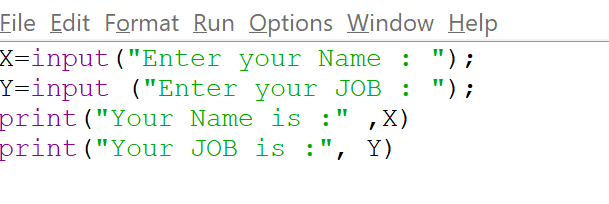
11.Input function
Python provides the function input(). input has an optional parameter, which is the prompt string. If the input function is called, the program flow will be stopped until the user has given an input and has ended the input with the return key.
Var = input (” …”) ;
Example ,
Input ,
Out put ,

 DayDreamsDatabases