 Posted by
 The article explores on below
- The installation of the database engine and the configuration of Machine Learning Services
- Configuration of Python.
- Configuration of the instance to allow execution of scripts that use an external executable
- Data-type support
- Samples to understand the use of Python in SQL.
Installation
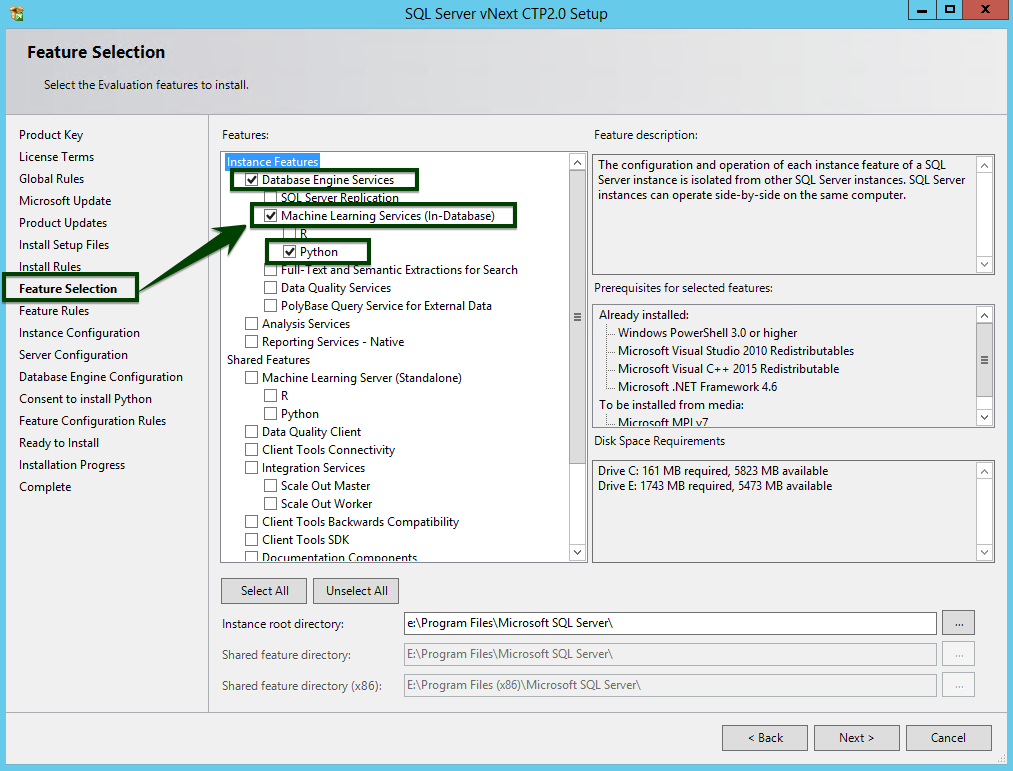
- Download SQL Server 2017 CTP 2.0. During Feature Selection at the time of installation, Python is listed as a part of Machine Learning Services.
- Run the setup wizard for SQL Server 2017.
- On the Installation tab, click New SQL Server stand-alone installation or add features to an existing installation.
- On the Feature Selection page, select both of the options as you see in the screenshot.
- Database Engine Services: To use Python with SQL Server, you must install an instance of the database engine.
- Machine Services (In-Database): This option installs the database services that support Python script execution.
- Python: Check this option to get the Python 3.5 executable and select libraries from the Anaconda distribution
On the below page, Consent to Install Python, click Accept.
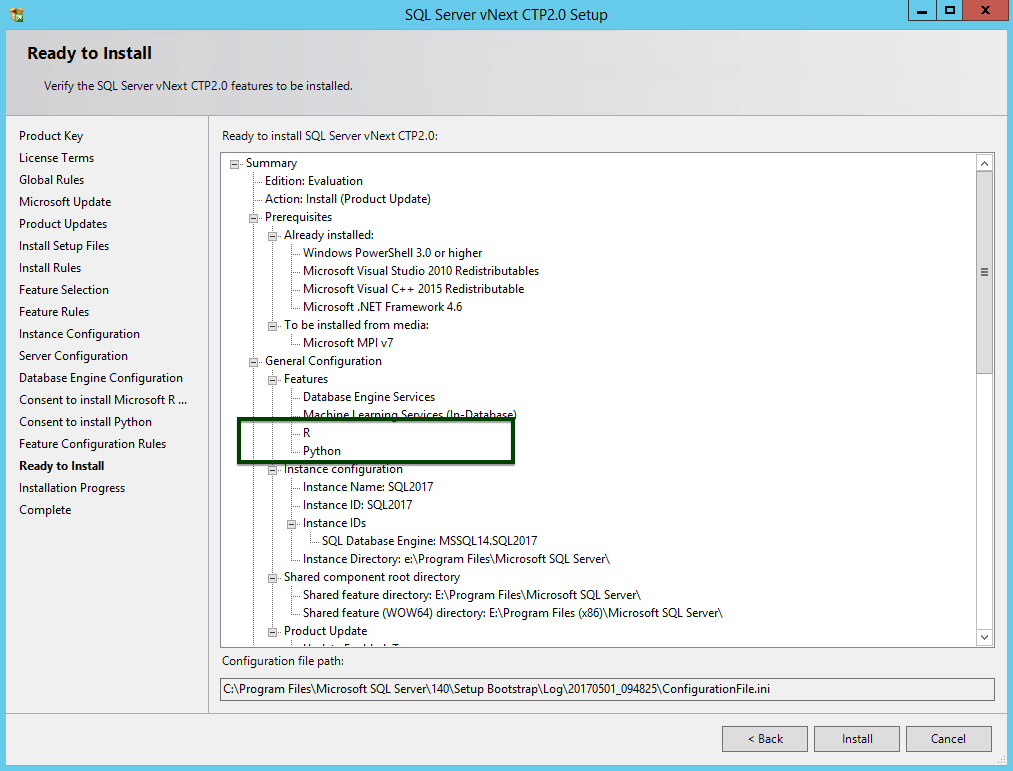
After a successful installation, the instance is ready for enabling an external script execution parameter.
To enable SQL Instance to run Python scripts:
- Open the SQL Server Management Studio.
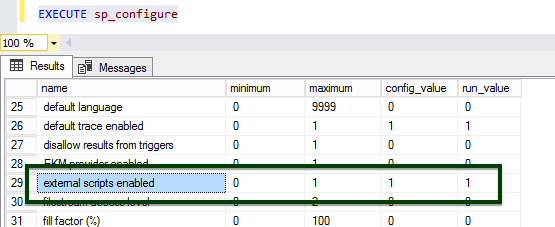
- Connect to the instance where Machine Learning Services is installed, and run the following command:sp_configure
- To enable the external scripting feature that supports Python, run the following statement.EXEC sp_configure ‘external scripts enabled’, 1
- RECONFIGURE WITH OVERRIDE
- Restart the SQL Instance.
sp_execute_external_script
The sp_execute_external_script is a system stored procedure that executes with a provided R/Python script as an argument. To enable normal functioning of this external stored procedure, you must have administrator access to your SQL Server instance, so that you can run the sp_configure command. The procedure will invoke the launchpad service to the respective library for its execution.
| sp_execute_external_script @language = N’language’ , @script = N’script’, @input_data_1 = ] ‘input_data_1’ [ , @input_data_1_name = ] N’input_data_1_name’ ] [ , @output_data_1_name = ‘output_data_1_name’ ] [ , @parallel = 0 | 1 ] [ , @params = ] N’@parameter_name data_type [ OUT | OUTPUT ] [ ,…n ]’ [ , @parameter1 = ] ‘value1’ [ OUT | OUTPUT ] [ ,…n ] [ WITH <execute_option> ] [;] <execute_option>::= { { RESULT SETS UNDEFINED } | { RESULT SETS NONE } | { RESULT SETS ( <result_sets_definition> ) } } |
| Parameter | Purpose |
| @language = N’Python’ | Scripting language parameter, In this case it’s Python |
| @script = N’ ‘ | Python script body |
| @input_data_1 = N’ T-SQL Statement’ | The T-SQL statement reads data from SQL Table |
| @output_data_1_name = N’ Data Frame Name’ | Holds the data frame generated inside the Python Script. |
| WITH RESULT SETS ((Col1 DataType,Col2 DataType )) | Specifies the Output column and Datatype of the dataframe columns. This is optional. |
Execute Python Code in SQL Server
Microsoft has made it possible to embed Python code directly in SQL Server databases by including the code as a T-SQL stored procedure.
Datatype Support
Python supports a limited number of data types in comparison to SQL Server. As a result, whenever you use data from SQL Server in Python scripts, the data might be implicitly converted to a type compatible with Python. However, often an exact conversion cannot be performed automatically, and an error is returned. This table lists the implicit conversions that are provided. Other data types are not supported.
| SQLTYPE | PYTHON TYPE |
| bigint | numeric |
| binary | raw |
| bit | bool |
| char | str |
| float | float64 |
| int | int32 |
| nchar | str |
| nvarchar | str |
| nvarchar(max) | str |
| real | float32 |
| smallint | int16 |
| tinyint | uint8 |
| varbinary | bytes |
| varbinary(max) | bytes |
| varchar(n) | str |
| varchar(max) | str |
Examples
Print the input value
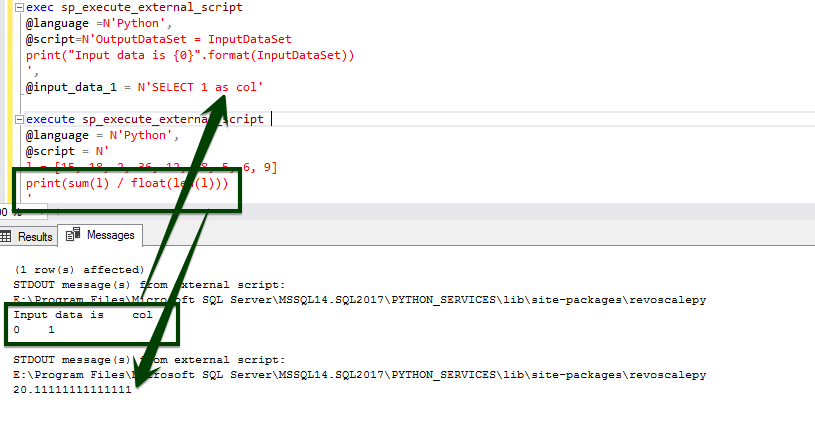
| exec sp_execute_external_script @language =N’Python’,@script=N’OutputDataSet = InputDataSetprint(“Input data is {0}”.format(InputDataSet))’, @input_data_1 = N’SELECT 1 as col’ |
Find Mean of a given list
| execute sp_execute_external_script @language = N’Python’,@script = N’l = [15, 18, 2, 36, 12, 78, 5, 6, 9]print(sum(l) / float(len(l)))’ |
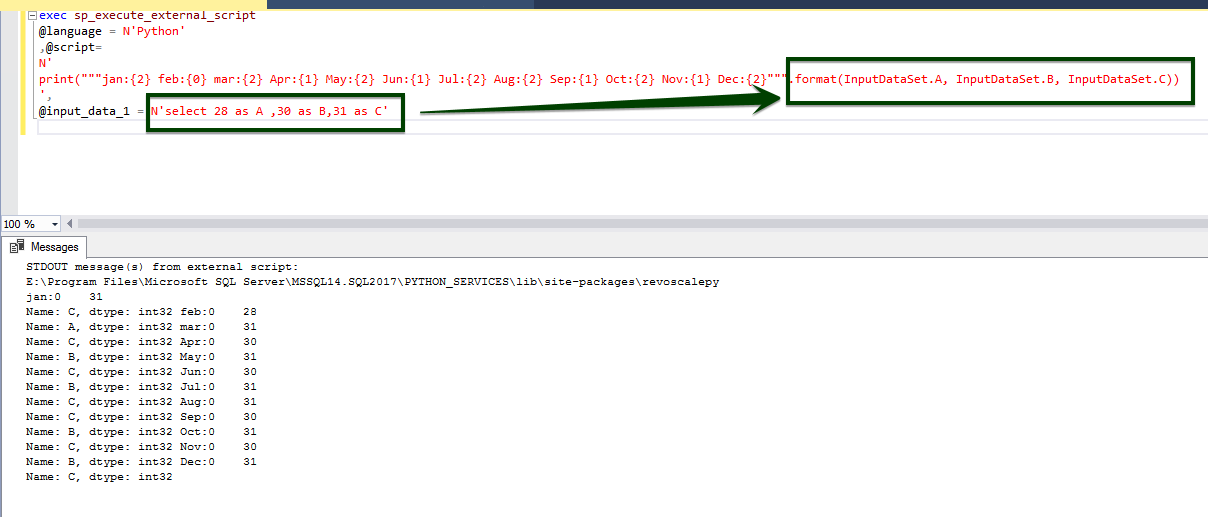
Format operator
| exec sp_execute_external_script@language = N’Python’,@script=N’print(“””jan:{2} feb:{0} mar:{2} Apr:{1} May:{2} Jun:{1} Jul:{2} Aug:{2} Sep:{1} Oct:{2} Nov:{1} Dec:{2}”””.format(InputDataSet.A, InputDataSet.B, InputDataSet.C))’,@input_data_1 = N’select 28 as A ,30 as B,31 as C’ |
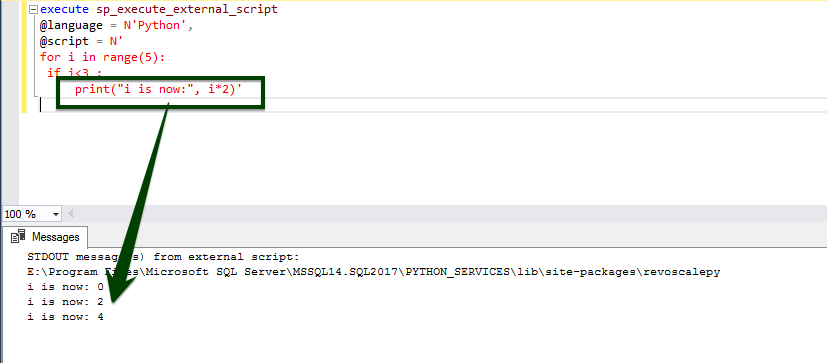
Using loops and branches
| execute sp_execute_external_script @language = N’Python’,@script = N’for i in range(5): if i<3 : print(“i is now:”, i*2)’ |
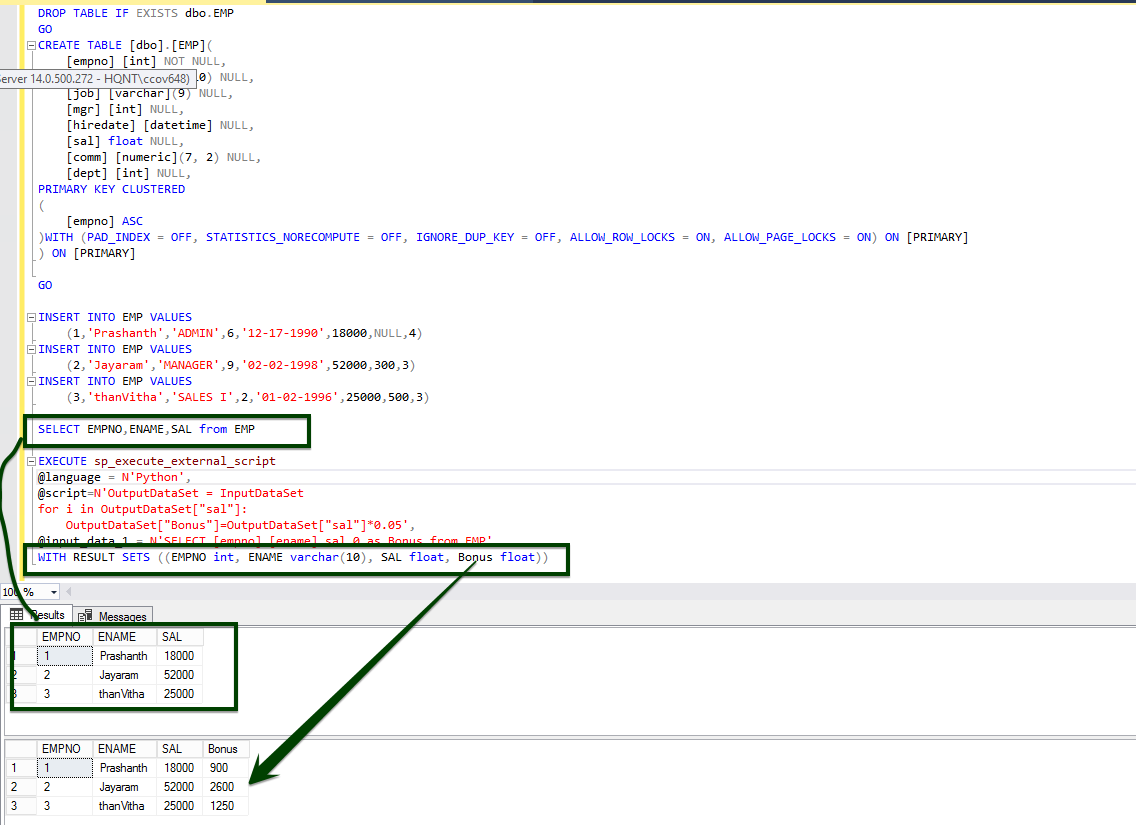
Passing a table as input and generating a computed column called bonus
- Create the EMP table
- Inserting dummy values
- Execute the Python script to generate the compute column
| DROP TABLE IF EXISTS dbo.EMPGOCREATE TABLE [dbo].[EMP]( [empno] [int] NOT NULL, [ename] [varchar](10) NULL, [job] [varchar](9) NULL, [mgr] [int] NULL, [hiredate] [datetime] NULL, [sal] float NULL, [comm] [numeric](7, 2) NULL, [dept] [int] NULL,PRIMARY KEY CLUSTERED ( [empno] ASC)WITH (PAD_INDEX = OFF, STATISTICS_NORECOMPUTE = OFF, IGNORE_DUP_KEY = OFF, ALLOW_ROW_LOCKS = ON, ALLOW_PAGE_LOCKS = ON) ON [PRIMARY]) ON [PRIMARY] GO INSERT INTO EMP VALUES (1,’Prashanth’,’ADMIN’,6,’12-17-1990′,18000,NULL,4)INSERT INTO EMP VALUES (2,’Jayaram’,’MANAGER’,9,’02-02-1998′,52000,300,3)INSERT INTO EMP VALUES (3,’thanVitha’,’SALES I’,2,’01-02-1996′,25000,500,3) SELECT EMPNO,ENAME,SAL from EMP EXECUTE sp_execute_external_script @language = N’Python’,@script=N’OutputDataSet = InputDataSetfor i in OutputDataSet[“sal”]: OutputDataSet[“Bonus”]=OutputDataSet[“sal”]*0.05′,@input_data_1 = N’SELECT [empno],[ename],sal,0 as Bonus from EMP’WITH RESULT SETS ((EMPNO int, ENAME varchar(10), SAL float, Bonus float)) |
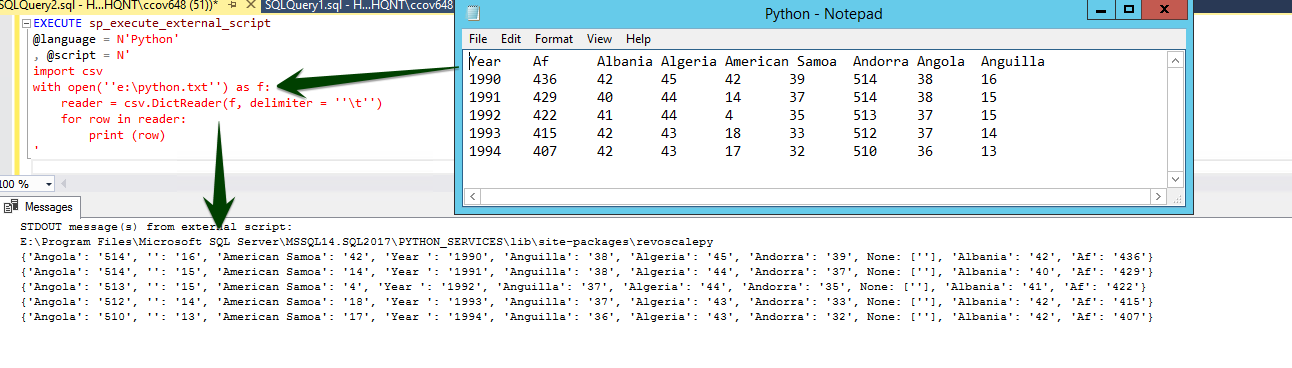
Read content from a text file using the DictReader function.
| EXECUTE sp_execute_external_script @language = N’Python’ , @script = N’import csvwith open(”e:\python.txt”) as f: reader = csv.DictReader(f, delimiter = ”\t”) for row in reader: print (row)’ |
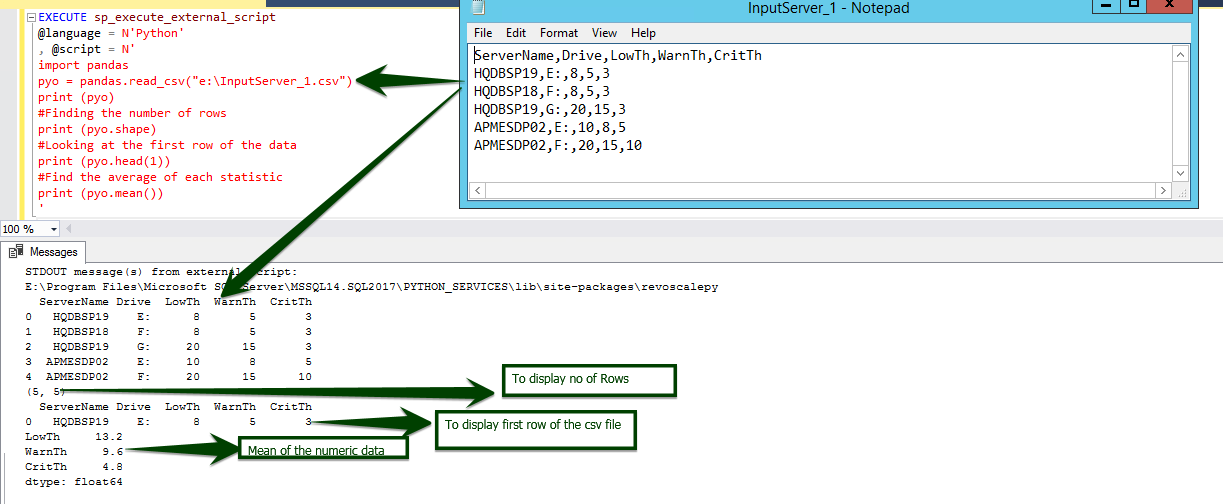
The following sample shows how to import the Pandas library to get access to dataframes and do the following tasks
- Read CSV file using Pandas library
- Find the number of Rows using Pandas object pyo
- Fetch the first row of the csv file
- Calculate the mean of every statistical column
| EXECUTE sp_execute_external_script @language = N’Python’ , @script = N’import pandaspyo = pandas.read_csv(“e:\InputServer_1.csv”)print (pyo)#Finding the number of rowsprint (pyo.shape)#Looking at the first row of the dataprint (pyo.head(1))#Find the average of each statisticprint (pyo.mean())’ |
Find the mean over the statistical column
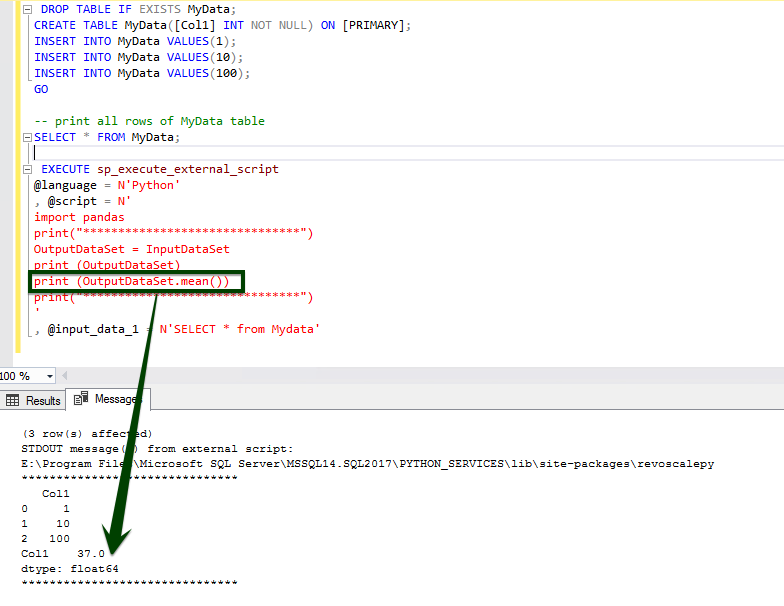
The data is fed from the table and the computation happens using the Pandas library
| DROP TABLE IF EXISTS MyData;CREATE TABLE MyData([Col1] INT NOT NULL) ON [PRIMARY];INSERT INTO MyData VALUES(1);INSERT INTO MyData VALUES(10);INSERT INTO MyData VALUES(100);GO — print all rows of MyData tableSELECT * FROM MyData; –Find mean of Col1 EXECUTE sp_execute_external_script @language = N’Python’ , @script = N’import pandasprint(“*******************************”)OutputDataSet = InputDataSetprint (OutputDataSet)print (OutputDataSet.mean())print(“*******************************”)’, @input_data_1 = N’SELECT * from Mydata’ |
Summary
This article covered how SQL Server 2017 introduces support for data analytics, and the use of Python in addition to R scripts. I’ve detailed the installation procedures, configuration details and execution of a sample Python SQL script.
The close integration of R/Python to SQL Server machine eliminates unnecessary movement of data across machines; think of moving millions/billions of rows to the client for modeling or scoring over the network—it is cumbersome, and a tedious job. This is one of the reasons why data scientists rely on sampling (Test set v/s Train Set). It’s a useful approach, especially where there are issues of data sovereignty and compliance. Your code runs inside the SQL Server security boundaries, triggered by a single call from the T-SQL stored procedures.
 DayDreamsDatabases